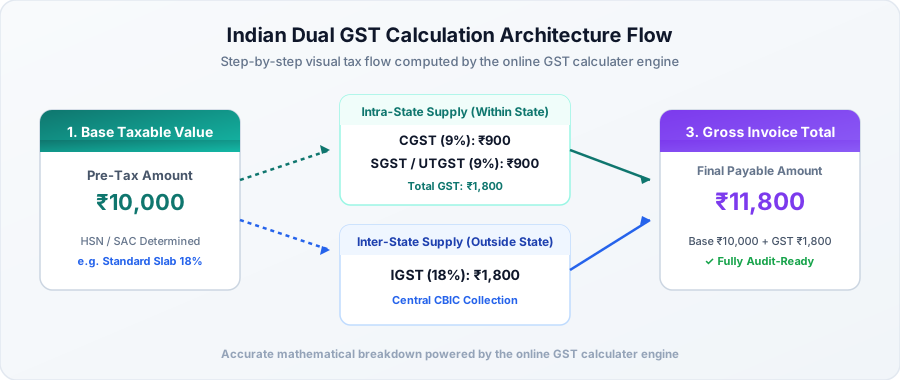
GST Calculator Mathematical Equations (Add vs Remove GST)
The Quick Formula Cheat Sheet:
Adding GST (Exclusive): Take your base price, multiply by the tax rate percentage, and divide by 100. Add that result to your base.
Removing GST (Inclusive): Take your total bill, multiply by 100, and divide by (100 + your tax rate). The difference is the tax collected.
1. Adding GST with a GST Calculator (Exclusive Formula)
This is standard for most B2B transactions. You agree on a project rate or wholesale price with your customer (say ₹40,000), and then charge tax on top of that figure when you issue the tax invoice:
Step 1: GST Amount = (Base Price × GST Rate) / 100
Step 2: Total Billed Amount = Base Price + GST Amount
Or in one step: Total Billed Amount = Base Price × (1 + GST Rate / 100)
A Real-World Example:
Say you run an IT consultancy and bill a client in your own state ₹40,000 at the standard 18% GST slab:
- Agreed Base Fee: ₹40,000
- Tax Calculation: (40,000 × 18) / 100 = ₹7,200
- CGST Portion (9%): ₹3,600
- SGST Portion (9%): ₹3,600
- Total Amount Payable by Client: 40,000 + 7,200 = ₹47,200
You can run this exact calculation on our live GST calculator.
2. Removing GST via GST Calculator (Inclusive Formula)
When you buy a smartphone, dine at a restaurant, or buy retail goods, the price on the tag is usually "Inclusive of all taxes." If an item costs ₹23,600 on the bill, the store didn't keep all ₹23,600—a chunk of that belongs to the government. Here is how to reverse-calculate the pre-tax base:
Step 1: Pre-Tax Base Price = Total Inclusive Price × [100 / (100 + GST Rate)]
Step 2: GST Collected = Total Inclusive Price - Pre-Tax Base Price
Why you cannot simply subtract 18% from the final price:
This is the most common arithmetic trap in retail accounting! If an item costs ₹118 (₹100 base + 18% tax) and you simply calculate 18% of ₹118, you get ₹21.24. Subtracting ₹21.24 leaves you with ₹96.76—which is incorrect. The 18% tax was added to the original base (100), not the final total (118). That's why you must divide by 118, not 100.
A Real-World Example:
You purchase a laptop for ₹23,600 including 18% GST:
- Total MRP Paid: ₹23,600
- Pre-Tax Cost: 23,600 × [100 / (100 + 18)] = 23,600 × (100 / 118) = ₹20,000
- Tax Retained by Government: 23,600 - 20,000 = ₹3,600
- Component Split (Intra-State): CGST (9%) = ₹1,800 | SGST (9%) = ₹1,800
Intra-State vs Inter-State GST Calculation Formulas
Whether your bill shows two separate tax lines (CGST + SGST) or just one (IGST) depends entirely on where your buyer is located relative to your business:
| Location of Buyer |
What Gets Charged |
How It's Calculated |
Who Gets the Revenue? |
| In your own state (Intra-State) |
CGST + SGST (or UTGST) |
Divide total tax equally by 2 |
50% to Central Govt + 50% to your State Govt |
| In a different state (Inter-State) |
IGST (Integrated GST) |
Charge the full rate as one line item |
Collected by Centre and shared with destination state |
Want to see how input credits flow across states? Read our Complete GST Guide for details on Input Tax Credit (ITC) utilization rules.