Product & Service Classification Search

HSN & SAC Code Finder with Integrated GST Calculator

GST calculator tools rely on classification codes to ensure you never charge the wrong tax rate on an invoice. In India, physical goods use HSN codes, while commercial services use SAC codes. A mistake here can lead to audit discrepancies, mismatched returns, or delayed input tax credit for your clients. Type your product or service name into the search bar below to find your code, or check our statutory rate slabs guide to see the full list of tax brackets.

Popular Goods & Services HSN / SAC Rate Finder (GST Calculator)

Search by product name, trade sector, or 4-digit code. Click "Use in Calculator" on any card to automatically transfer that rate to our GST calculator.

Understanding HSN and SAC Classifications in India

The Plain-English Difference:

HSN (Harmonized System of Nomenclature) is used for physical, tangible goods (like clothing, electronics, machinery, or medicines).
SAC (Services Accounting Code) is used exclusively for intangible commercial services (like software consulting, legal advice, hospitality, or freight).

What is the Difference Between HSN and SAC Codes?

Both codes exist to prevent ambiguity on tax invoices. For instance, rather than having a seller describe an item simply as "computer accessory" (which could mean anything), specifying HSN 8471 tells the tax portal exactly what the item is and validates that the 18% rate was applied correctly.

Feature HSN Code (Physical Goods) SAC Code (Services)
What it covers Physical products you can touch, store, and ship Services, software consulting, and intellectual labor
How many digits? 2, 4, 6, or 8 digits (based on turnover) Uniformly 6 digits (always begins with 99)
Global standard Standardized globally by World Customs Organization Created specifically by CBIC for Indian GST
Everyday Example HSN 8471 (Laptops), HSN 7113 (Gold Jewelry) SAC 998313 (IT Consulting), SAC 996331 (Restaurant)

How to Use the HSN Directory with our GST Calculator

Putting the right code on your tax invoice takes three simple steps:

  1. Type the name of your product or service into the search bar above.
  2. Note the designated code and statutory rate displayed on the card.
  3. Click "Use in Calculator" to automatically pass that rate into our main GST calculator tool.
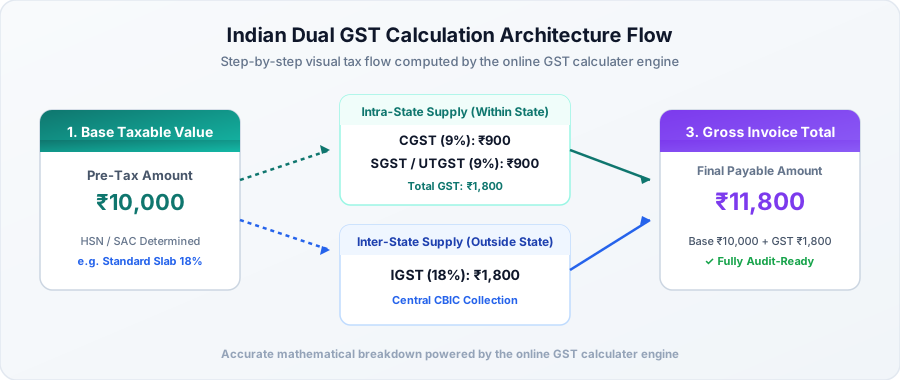
Mandatory HSN Digit Rules on GST Invoices (CBIC Guidelines)

You do not need to print all 8 digits on every single invoice unless you are an exporter or large corporation. The CBIC set pragmatic turnover thresholds so smaller businesses aren't burdened with unnecessary paperwork:

  • Annual Turnover up to ₹5 Crore (B2B Invoices): You must include at least 4 digits of the HSN code on B2B invoices. On B2C invoices to walk-in retail shoppers, mentioning HSN is optional.
  • Annual Turnover exceeding ₹5 Crore: You must print at least 6 digits of the HSN code on all B2B and B2C tax invoices without exception.
  • Imports and Exports: All foreign trade transactions must specify the full 8-digit HSN code regardless of company turnover.
gst calculator

Ensure 100% Invoice Compliance with our GST Calculator

Wrong classification codes can hold up your buyer's input credit claims. Keep your bills clean and fully aligned with CBIC standards.